

The possibility to create Jira tickets in an automated can be very handy. But it can be a little bit tricky because Jira is quite customizable and therefore there is no universal PowerShell function that will work for everybody.
In this post, I will show you how to solve this challenge 😉.
In our company, we use a cloud Confluence solution. So mainly authentication part will be different for the on-premises version of the Jira.
You can use my function New-JiraTicket as a template, but without modification, this won't work in your environment!
Prerequisites
- Official PowerShell module JiraPS
- Account with permission to create tickets in your Jira project + it's API token
- To know your:
- Confluence URL (
https://contoso.atlassian.net) - Jira project name
- can be retrieved from the URL of your project (
https://contoso.atlassian.net/jira/servicedesk/projects/**PROJECTNAME**/queues)
- can be retrieved from the URL of your project (
- Confluence URL (
For purposes of this article, I will use following made-up values:
- Confluence account that has permissions to create a Jira ticket == JiraTicketCreator@contoso.com
- Confluence URL == https://contoso.atlassian.net
- Jira project name == helpdesk
- Jira issue type == IT Help
Step 1 - Authentication
Granting permission to create Jira ticket
- Login to your Jira project with an account that can grant permissions to other users (admin)
- Open
Project settings > People > Add peopleand add the account you want to grant permissions to (JiraTicketCreator@contoso.com) and select roleService desk team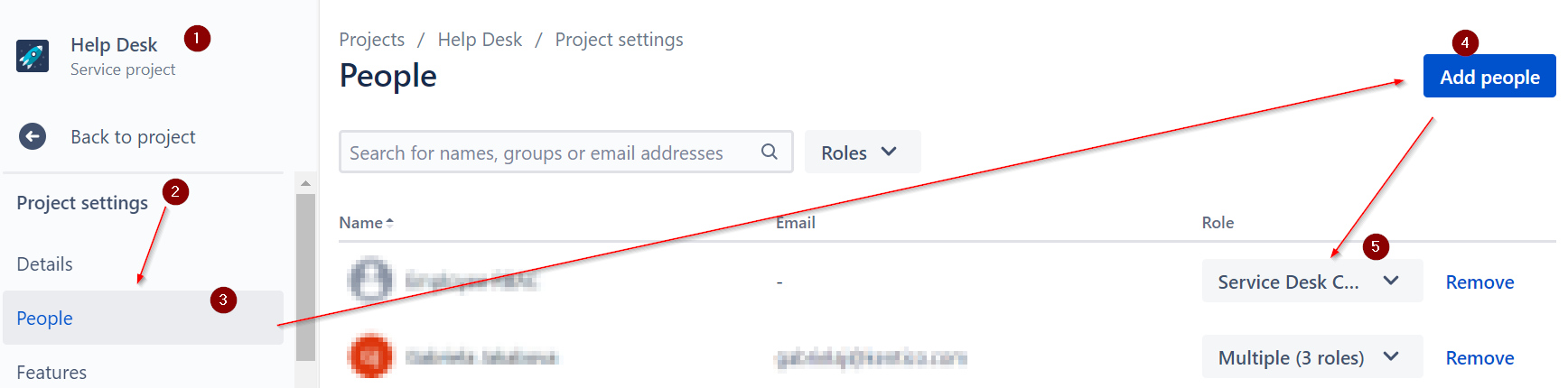
API key creation
- Log to your Confluence environment as a user that has permission to create tickets (JiraTicketCreator@contoso.com) in your Jira project
- Follow this tutorial to create API key
- Save this API key to a safe location so we can use it later
Using API key for authentication
The PowerShell code that can be used to authenticate to our made-up Cloud Jira environment 👇
Import-Module JiraPS
$credential = Get-Credential -UserName 'JiraTicketCreator@contoso.com' -Message "Use account's API TOKEN as a password!"
Set-JiraConfigServer 'https://contoso.atlassian.net'  # required since version 2.10
New-JiraSession -Credential $credential
Step 2 - Getting all prerequisites for creating the ticket
Jira tickets can have several required fields that have to be filled so the ticket can be created. And this totally depends on your setup.
The ticket can be of different types, sub-types, there can be participants, description, etc.
So how can we find what fields are available and the list of values we can use to fill them?
There is official article about this topic.
Get basic ticket/issue information 👇
# get Jira projects
Get-JiraProject

# get Jira issue types
Get-JiraIssueType

# get all ticket fields
Get-JiraIssueCreateMetadata -Project 'helpdesk'-IssueType 'IT Help'

# get only required ticket fields
Get-JiraIssueCreateMetadata -Project 'helpdesk' -IssueType 'IT Help' | ? required

# get all ticket fields and their allowed values
Get-JiraIssueCreateMetadata -Project 'helpdesk'-IssueType 'IT Help' | % {$_ | select Id, Name, Required, @{n='AllowedValues';e={$_.AllowedValues.Value}}}
In case there are some required custom fields, you have to prepare a hashtable that will set them correctly when the ticket will be created 👇.
So let's say that our ticket has one required field (Support area) 👇
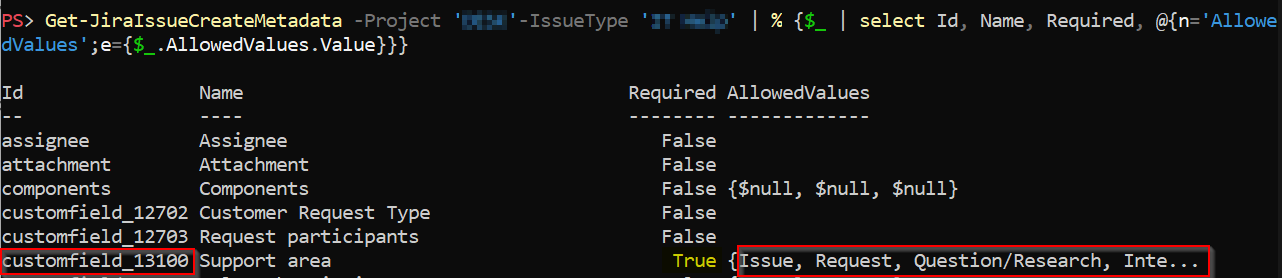 So we create a new
 $field hash-table, where the key will be the id of such field and value will be another hash-table like 👇 There is also an official article about working with custom fields.
$field = @{
    'customfield_13100' = @{
        value = 'issue'
    }
}
ATTENTION! values in most of the Jira PowerShell commands are case-sensitive!
Step 3 - Creating the ticket
Now when we are authenticated and the hash-table ($field) for defining required field(s) is set we can create our ticket like 👇
$params = @{
    Project     = 'helpdesk'
    IssueType   = 'IT Help'
    Summary     = "Some issue"
    Description = "blablabla"
}
if ($field) {
    $params.Fields = $field
}

New-JiraIssue @params
The whole code than can look like 👇. But don't forget that I am using made-up values!
Import-Module JiraPS

# authenticate
$credential = Get-Credential -UserName 'JiraTicketCreator@contoso.com' -Message "Use account's API TOKEN as a password!"
Set-JiraConfigServer 'https://contoso.atlassian.net'  # required since version 2.10
New-JiraSession -Credential $credential

# prepare hash with required fields
$field = @{
    'customfield_13100' = @{
        value = 'issue'
    }
}

# create Jira ticket
$params = @{
    Project     = 'helpdesk'
    IssueType   = 'IT Help'
    Summary     = "Some issue"
    Description = "blablabla"
    Fields = $field
}

New-JiraIssue @params
TIP: What about adding participants?
If your ticket supports adding of participants, you can add them like 👇
# get participants field ID (I assume that field is named "Request Participants")
$customFieldId = Get-JiraIssueCreateMetadata -Project 'helpdesk'-IssueType 'IT Help' | ? name -EQ "Request Participants" | select -expand Id

# list of participants IDs
$participantList = @()

# translate participants UPN to ID (because of GDPR)
'JohnDoe@contoso.com', 'MarieF@contoso.com' | % {
    # name cannot be used because of GDPR strict mode enabled
    # special permission had to be granted for accessing user rest api section
    # global permission to "Browse users and groups"
    $accountId = Invoke-JiraMethod "https://contoso.atlassian.net/rest/api/3/user/search?query=$_" | select -ExpandProperty accountId
    if ($accountId) {
        $participantList += @{ accountId = $accountId }
    } else {
        Write-Warning "User $_ wasn't found i.e. won't be added as participant"
    }
}

# enrich existing hash-table with participants
$field.$customFieldId = @($participantList)
Summary
I hope this helps somebody and again, you can check my New-JiraTicket function as an inspiration.
About the author
I work as System Administrator for more than 15 years now and I love to make my life easier by automating work & personal stuff via PowerShell (even silly things like food recipes list generation).
Comments
Join the discussionTHANK YOU very much, that was most helpful. I run Selenium test cases in an Azure DevOps pipeline and I wanted to create automatically a JIRA bug for each failed test case. Did you write JiraPS module?
Thanks 👍
No I haven't created JiraPS module. It's an official one.
Hi, I tried your code to create New Jira Ticket but getting below error?
Error: Unable to find 'Request Participants' field id in the project IAMI.
Any idea ?
I assume you are talking about part "TIP: What about adding participants?"? What command exactly gives you this error?


