
Extracting HTML table from a web page (or HTML file) and converting it into PowerShell object

Several months ago I've created ConvertFrom-HTMLTable function for helping me extract HTML tables from locally saved HTML files or live web pages and convert them into usable PowerShell objects. So it is not a new function but I think it deserves a standalone post because it can be quite handy.
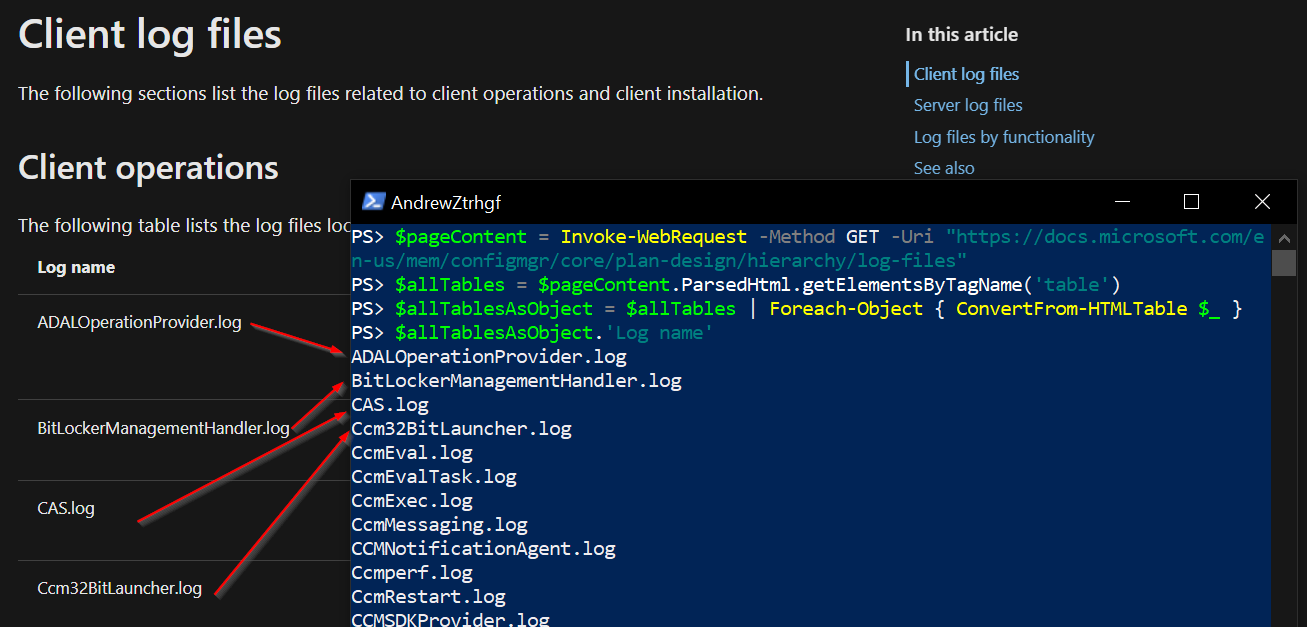
I've used it when I was talking about working with Confluence tables and now it helped me to retrieve a list of all SCCM logs from the official documentation page for my Get-CMLog function.
If you check that documentation page you will see there are several tables with dozens of log names so it would be a nightmare to get them by hand.
So how did I get all these log names? 👇
# get content of web page
$pageContent = Invoke-WebRequest -Method GET -Uri "https://docs.microsoft.com/en-us/mem/configmgr/core/plan-design/hierarchy/log-files"
# save all html tables
$allTables = $pageContent.ParsedHtml.getElementsByTagName('table')
# convert html tables to PowerShell objects
$allTablesAsObject = $allTables | Foreach-Object { ConvertFrom-HTMLTable $_ }
# output just 'Log name' property
$allTablesAsObject.'Log name'
And the result was like this 👇
Easy right? 🤓
Features of the ConvertFrom-HTMLTable function
- converts ComObject representing HTML table to PowerShell object
- it can be retrieved from a local HTML file or web page (check function examples)
- supports setting the name of the table as 'TableName' property of the PowerShell object
- supports HTML tables without header
- if a table has 2 columns it will return a PowerShell object where the first column will be names of the properties and second their values
- if a table has more than 2 columns, a PowerShell object will have numbers as property names
Enjoy 🎁
About the author
I work as System Administrator for more than 15 years now and I love to make my life easier by automating work & personal stuff via PowerShell (even silly things like food recipes list generation).
Comments
Join the discussionI don't see why it shouldn't. If you will be able to extract that HTML from the email body.
Tried and get the following:
"At line:103 char:73
- ... tent = Invoke-WebRequest -Method GET -Headers $Headers -Uri <!DOCTYPE ...
- ~ The '<' operator is reserved for future use.
At line:118 char:8
- @media only screen and (max-width: 640px) {
- ~~~~ Unexpected token 'only' in expression or statement.
At line:126 char:8
- @media only screen and (max-width: 640px) {
- ~~~~ Unexpected token 'only' in expression or statement.
At line:134 char:8
- @media only screen and (max-width: 640px) {
- ~~~~ Unexpected token 'only' in expression or statement.
At line:142 char:8
- @media only screen and (max-width: 640px) {
- ~~~~ Unexpected token 'only' in expression or statement.
At line:151 char:8
- @media only screen and (max-width: 640px) {
- ~~~~ Unexpected token 'only' in expression or statement.
At line:165 char:8
- @media only screen and (max-width: 640px) {
- ~~~~ Unexpected token 'only' in expression or statement.
At line:173 char:8
- @media only screen and (max-width: 640px) {
- ~~~~ Unexpected token 'only' in expression or statement.
Not all parse errors were reported. Correct the reported errors and try again."
Hey!
Is this function source code on ur GitHub?
Or is that a PowerShell native command?
Jackson
It's on my github https://github.com/ztrhgf/useful_powershell_functions/blob/master/ConvertFrom-HTMLTable.ps1
Thanks!


