
PowerShell AST, your friend when it comes to PowerShell code analysis & extraction
In my previous post about automating PowerShell module creation I've mentioned usage of AST for code analysis. Mainly for extracting information like function definition, aliases etc.
So today I will show you some basics, plus give you several real world examples, so you can start your own AST journey :).
Table of contents
Introduction
AST is abbreviation of Abstract Syntax Tree and it is built-in PowerShell feature for code analysis. In general it will create hierarchic tree of AST objects, representing given code. You can use it for example to extract various information from the code like variables, function definitions, function parameters, aliases, begin/process/end blocks or to self-aware code analysis (code checks itself).
What are the necessary steps, to use AST?
1. Get AST object for your code
- get AST object from script file
# get AST object from script file $script = 'C:\Scripts\SomeScript.ps1' $AST = [System.Management.Automation.Language.Parser]::ParseFile($script, [ref]$null, [ref]$null) - get AST object from PowerShell code
# get AST object from PowerShell code
# btw to analyze code from which you call this command, use $MyInvocation.MyCommand.ScriptContents instead $code
$code = @'
some powershell code here
'@
$AST = [System.Management.Automation.Language.Parser]::ParseInput($code, [ref]$null, [ref]$null)
2. Decide what AST class type you are looking for
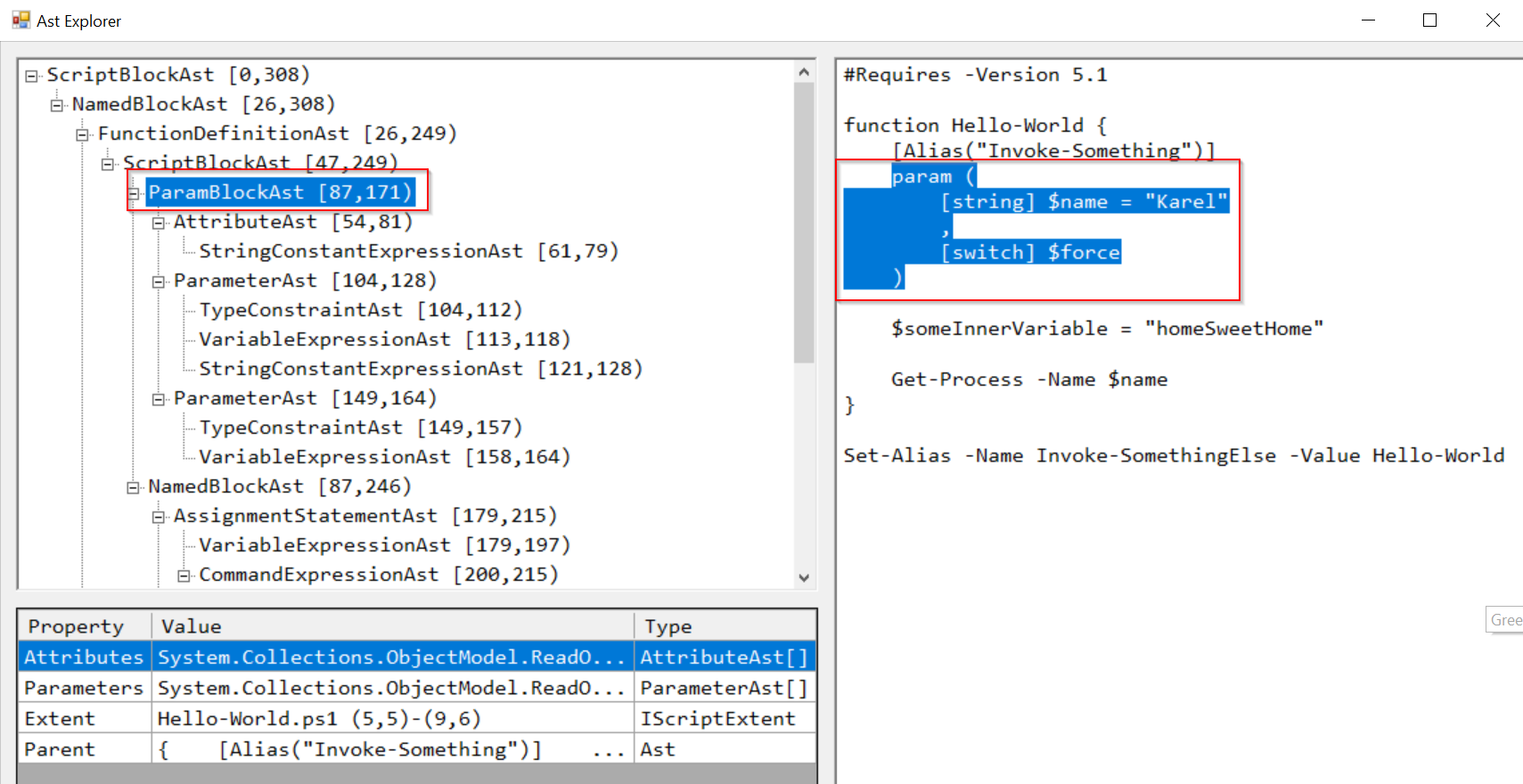
- for beginners I recommend using great ShowPSAst module
# install ShowPSAst module Install-Module -Name ShowPSAst -Scope CurrentUser -Force # import commands from ShowPSAst module Import-Module ShowPSAst # show the AST of a script or script module Show-Ast C:\Scripts\someScript.ps1 So it is super easy to find AST type. Just go through the middle column items and corresponding counterparts in analyzed code will be highlighted in the right column.
- for beginners I recommend using great ShowPSAst module
- Btw there is also more universal tool called Show-Object, that can visualize any PowerShell object
- Check official documentation for complete list of AST class types
Anyway I've chosen to find function parameters i.e. ParameterAst, so lets move on to...
3. Find specific type of AST object
- there are two main methods to search the AST object:
Find()(return just first result) andFindAll()(return all results)- So how to use
FindAll()? This method needs two parameters. First one (predicate) is for filtering the results and second one (recurse) is just switch for searching nested scriptBlocks too.
- So how to use
# search criteria for filtering what AST objects will be returned
# it has to be scriptBlock which will be evaluated and if the result will be $true, object will be included
$predicate = {param($astObject) $astObject -is [System.Management.Automation.Language.<placeASTTypeHere>] }

# search nested scriptBlocks too
$recurse = $true

# traverse the tree and return all AST objects that match $predicate
$AST.FindAll($predicate, $recurse)


# to get all AST objects
$AST.FindAll($true, $true)

# to get only ParameterAst AST objects
# remember this syntax and just customize the last class part (i.e. ParameterAst in this example)
$AST.FindAll({ param($astObject) $astObject -is [System.Management.Automation.Language.ParameterAst] }, $true)
So our search for ParameterAst in Hello-World.ps1 will return
 In similar way, you can search for anything you like (anything AST has class for, to be more precise). So now is the right time to give you some examples, how I use AST in my projects.
Real world examples
I will use this script Hello-World.ps1 for all examples bellow!
#Requires -Version 5.1

function Hello-World {
    [Alias("Invoke-Something")]
    param (
        [string] $name = "Karel"
        ,
        [switch] $force
    )

    $someInnerVariable = "homeSweetHome"

    Get-Process -Name $name
}

Set-Alias -Name Invoke-SomethingElse -Value Hello-World
And create AST object like this
$AST = [System.Management.Automation.Language.Parser]::ParseFile('C:\Scripts\Hello-World.ps1', [ref]$null, [ref]$null)
1. How to get variables
- I am using this for pre-commit validations of changes made in our company central Variables.psm1 PowerShell module. Specifically to cancel commit, in case, when newly created variable name, doesn't start with underscore. Or to warn the user, if he modify or delete variable, that is used elsewhere in our central repository.
function _getVariableAST {
    param ($AST, $varToExclude, [switch] $raw)

    $variable = $AST.FindAll( { $args[0] -is [System.Management.Automation.Language.VariableExpressionAst ] }, $true)
    $variable = $variable | Where-Object { $_.parent.left -or $_.parent.type -and ($_.parent.operator -eq 'Equals' -or $_.parent.parent.operator -eq 'Equals') }

    if ($raw) {
        return $variable
    }

    $variable = $variable | Select-Object @{n = "name"; e = { $_.variablepath.userPath } }, @{n = "value"; e = {
            if ($value = $_.parent.right.extent.text) {
                $value
            } else {
                # it is typed variable
                $_.parent.parent.right.extent.text
            }
        }
    }

    # because of later comparison unify newline symbol (CRLF vs LF)
    $variable = $variable | Select-Object name, @{n = "value"; e = { $_.value.Replace("`r`n", "`n") } }

    if ($varToExclude) {
        $variable = $variable | Where-Object { $_.name -notmatch $varToExclude }
    }

    return $variable
}
And the result will be

2. How to get aliases
This is essential for my Export-ScriptToModule function to get all aliases defined in script file, to be able to later export them in generated PowerShell module using Export-ModuleMember.
function _getAliasAST {
    param ($AST, $functionName)

    $alias = @()

    # aliases defined by Set-Alias
    $AST.EndBlock.Statements | ? { $_ -match "^\s*Set-Alias .+" -and $_ -match [regex]::Escape($functionName) } | % { $_.extent.text } | % {
        $parts = $_ -split "\s+"

        $content += "`n$_"

        if ($_ -match "-na") {
            # alias set by named parameter
            # get parameter value
            $i = 0
            $parPosition
            $parts | % {
                if ($_ -match "-na") {
                    $parPosition = $i
                }
                ++$i
            }

            $alias += $parts[$parPosition + 1]
        } else {
            # alias set by positional parameter
            $alias += $parts[1]
        }
    }

    # aliases defined by [Alias("Some-Alias")]
    $AST.FindAll( {
            param([System.Management.Automation.Language.Ast] $AST)

            $AST -is [System.Management.Automation.Language.AttributeAst]
        }, $true) | ? { $_.parent.extent.text -match '^param' } | Select-Object -ExpandProperty PositionalArguments | Select-Object -ExpandProperty Value -ErrorAction SilentlyContinue | % { $alias += $_ }

    return $alias
}
And the result will be

3. How to get function definition
This is also essential for my Export-ScriptToModule function to validate number of defined functions in script file (it has to be exactly one), defined function name (it has to match with ps1 name and will be used in Export-ModuleMember) and content (it will be used to generate PowerShell module).
function _getFunctionAST {
    param ($AST)

    $AST.FindAll( {
            param([System.Management.Automation.Language.Ast] $AST)

            $AST -is [System.Management.Automation.Language.FunctionDefinitionAst] -and
            # Class methods have a FunctionDefinitionAst under them as well, but we don't want them.
            ($PSVersionTable.PSVersion.Major -lt 5 -or
                $AST.Parent -isnot [System.Management.Automation.Language.FunctionMemberAst])
        }, $true)
}
And the result will be

4. How to get function parameters
I am using this for pre-commit validations. In particular to warn the user, in case he made change in parameter of function, that is used elsewhere in our repository. So he can check, this commit won't break anything.
function _getParameterAST {
 param ($AST, $functionName)

 $parameter = $AST.FindAll( { $args[0] -is [System.Management.Automation.Language.ParamBlockAst] }, $true) | Where-Object { $_.parent.parent.name -eq $functionName }

 $parameter.parameters | Select-Object @{n = 'name'; e = { $_.name.variablepath.userpath } }, @{n = 'value'; e = { $_.defaultvalue.extent.text } }, @{ n = 'type'; e = { $_.staticType.name } }
}
And the result will be

5. How to get script requirements
Again, this is used in Export-ScriptToModule function to have option to exclude requirements from generated PowerShell module.
$AST.scriptRequirements.requiredModules.name
And the result will be

Summary
I hope that you've find some useful new information here. In case of any questions, don't hesitate to write me some comments! And for those, who want to go deeper into AST, check this detailed article about AST.
PS: I will be talking about GIT hooks automation, and my CI/CD solution in some of upcoming blog posts, don't worry :)
About the author
I work as System Administrator for more than 15 years now and I love to make my life easier by automating work & personal stuff via PowerShell (even silly things like food recipes list generation).
Comments
Join the discussionNo comments yet. Be the first to comment.
CI/CD for PowerShell
This series will be about my CI/CD solution for PowerShell content. For final solution please check https://github.com/ztrhgf/Powershell_CICD_repository


