
How to get all Graph PowerShell SDK modules required to run selected code using PowerShell
I work as System Administrator for more than 15 years now and I love to make my life easier by automating work & personal stuff via PowerShell (even silly things like food recipes list generation).
In my previous article, I've shown you, how to get the permissions required to run selected PowerShell code. Today I will focus on getting Microsoft Graph PowerShell SDK modules.
The official Find-MgGraphCommand function, which retrieves the parent module for Graph Mg* commands, is undoubtedly beneficial. However, the task of extracting all these commands (including those for direct Graph API calls) from analyzed code, remains a challenging and tedious process.
Let's meet my PowerShell function Get-CodeGraphModuleDependency (part of the module MSGraphStuff) that solves all these issues.
Introduction
Function Get-CodeGraphModuleDependency gets Graph PowerShell SDK modules that are needed to run selected code.
Under the hood, it uses my other, more universal function Get-CodeDependency (part of DependencySearch module) that returns all code dependencies by analyzing its AST and doing some other magic, to search for all official Mg* commands (like Get-MgUser, ...).
When Mg* commands are extracted, an official Find-MgGraphCommand command is used to get their hosting SDK modules.
Get-CodeGraphModuleDependency is part of the module MSGraphStuff.
Main features
Extracts all official Mg* Graph commands from the given code and returns their parent PowerShell SDK modules
- returns
Microsoft.Graph.Usersmodule forGet-MgUser,Microsoft.Graph.Identity.DirectoryManagementforUpdate-MgDevice, ...
- returns
Extracts and returns explicitly imported PowerShell SDK modules
- returns
Microsoft.Graph.Usersin case ofImport-Module Microsoft.Graph.Users
- returns
Supports recursive search across all code dependencies
- so you can get the complete modules list not just for the code itself, but for all its dependencies too
The output of the Get-CodeGraphModuleDependency
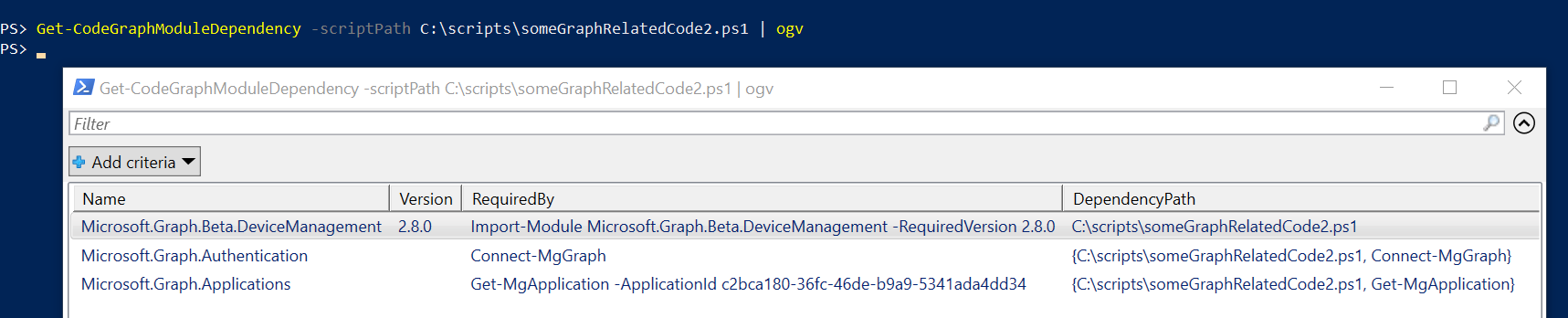
If we send the function results to Out-GridView to get a graphical representation, we can get results similar to this 👇
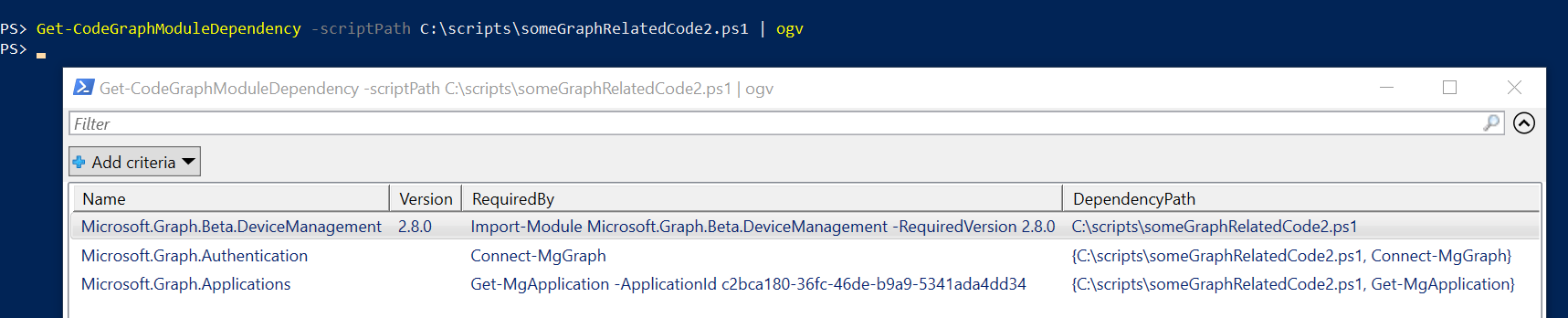
As you can see there are several properties returned for each found module:
Name - name of the Graph SDK module that is needed
Version - version (if specified) of the Graph SDK module that is needed
- for example when
Import-ModulewithRequiredVersionparameter is used
- for example when
RequiredBy - the original code line where the command that requires this module was found
DependencyPath - the whole path to the found command
- useful when using
goDeepparameter to understand where the command was found
- useful when using
Use cases
The following examples will be made against this test code
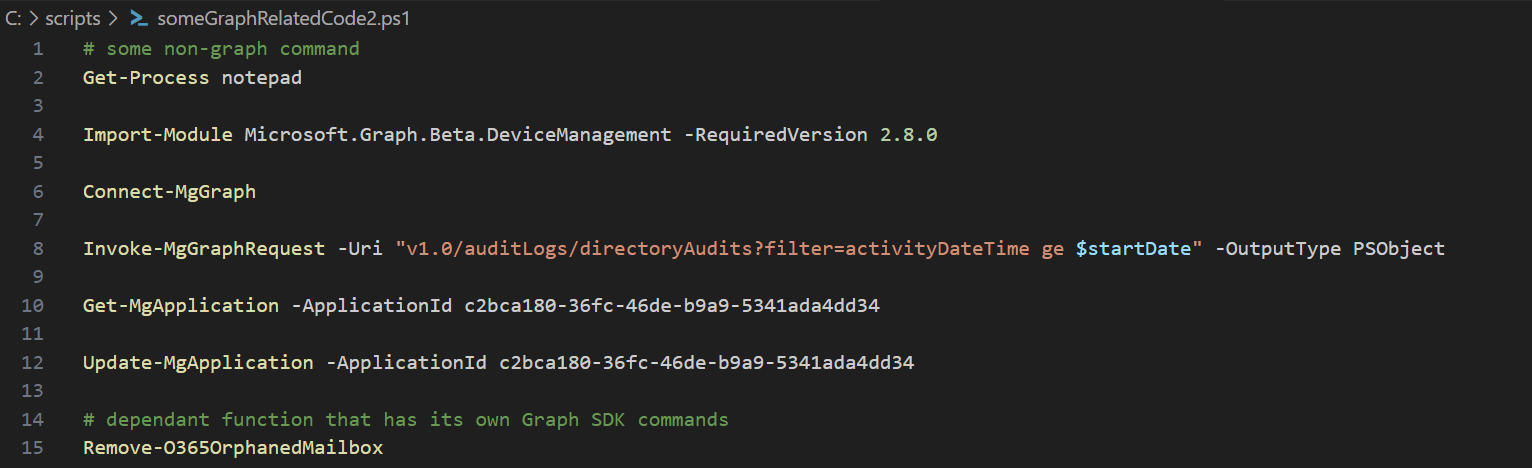
Can be downloaded from GitHub Gist.
Return Graph PowerShell SDK modules required by selected code
The following code will return only modules directly required by code in the selected script.
If there are some indirect dependencies (like calling another function that invokes some Graph commands itself), they won't be returned!
Get-CodeGraphModuleDependency -scriptPath C:\scripts\someGraphRelatedCode2.ps1 | ogv
The result will look like this 👇

When you compare the result with the test code you can notice that:
unrelated commands like
Get-Processare ignoredspecified module version in line with
Import-Modulegets its way toVersionpropertyeach module is returned only once hence Microsoft.GraphApplications is returned for
Get-MgApplication, but not forUpdate-MgApplication- to change this, use the switch
allOccurrences
- to change this, use the switch
Return ALL Graph PowerShell SDK modules required by selected code and its dependencies
The following code will return all modules required by the code in the selected script, no matter if the module was needed in the code itself, or in the called functions, etc.
Get-CodeGraphModuleDependency -scriptPath C:\scripts\someGraphRelatedCode2.ps1 -goDeep | ogv

As you can see there are some new results returned. Those two new results belong to 3rd party function Remove-O365OrphanedMailbox that is being called in the test script. And thanks to goDeep parameter it was now searched for the dependencies too.
Get-CodeGraphPermissionRequirement to get more details about what is going on under the hoodNow that you know how to use this function don't be afraid to test it against your code. Hopefully, this will help you on your Graph API journey 👍


