
Get overall status of your clients in AD, AAD, Intune and SCCM services
And create report of the problematic ones

Who should continue reading? Anyone who is using AAD, Intune or SCCM and want to know for example: which clients aren't synchronized to AAD, aren't co-managed, don't have SCCM client installed, haven't contacted AAD/Intune or SCCM for a long time, and much much more.
In our environment, we are using on-prem Active Directory, Azure Active Directory (Hybrid AD join) and Intune with SCCM (co-management) for managing our clients.
If you are in a similar situation, you probably know, it can be very difficult to get the meaningful overall status of your environment i.e. if all your clients are synchronized to Azure and are properly managed by SCCM and Intune, etc. It is hard because, for example, Intune can say that client XYZ is co-managed, but SCCM tells you otherwise. The problem is that information from Intune can be obsolete and vice versa, so you have to take into account also date when the client contacted such service. Another problem can be duplicity records in Azure/Intune.
I was in such situation too, so I decided to create a PowerShell function Get-MDMClientData to gather and merge information from all (or subset of) these services to be able to easily detect problematic clients. And function Get-ClientStatusReport to get the report with problematic clients.
Prerequisites
For SCCM data retrieval:
- working SCCM Administration Service API (should be by default)
- account with proper permissions to read device data (SCCM admin or follow this tutorial)
For Intune & Azure data retrieval:
- Azure App registration ID & secret with permissions to read device data (follow this tutorial)
For AD data retrieval:
- AD PowerShell module
- domain user
I am using Azure App registration for authentication instead of user credentials because of the possibility to use it in an unattended way.
TL;DR
- Meet prerequisites for services you want to get data from
- Download Get-MDMClientData.ps1 script
- Search for "FIXME" in downloaded script and do what they say and save the file
- Dot source downloaded script in PowerShell console
- Run function Get-MDMClientData (with appropriate parameters)
- Download and (in the same console where you dot sourced Get-MDMClientData) dot source Get-ClientStatusReport and call Get-ClientStatusReport
Table of contents
How function Get-MDMClientData works
The function Get-MDMClientData.ps1 purpose is to get client "health" data from one (or subset) of the services (Active Directory, Azure Active Directory, SCCM, Intune) into one place (object). To easily detect and diagnose problems. It uses Graph API for reading client's data from Intune ad AzureAD and SCCM Administration Service API for getting SCCM client's data. For each service, it gathers only chosen (important) properties and adds them to the resultant object.
! Beware that before first use, it has to be manually edited ! Search for "FIXME" inside the function text and do what they say, i.e. hardcode your SCCM server name and your Azure tenant name.
The function internally uses a lot of other custom functions. I've added them to the function body to make the usage as simple as possible.
How result can look like
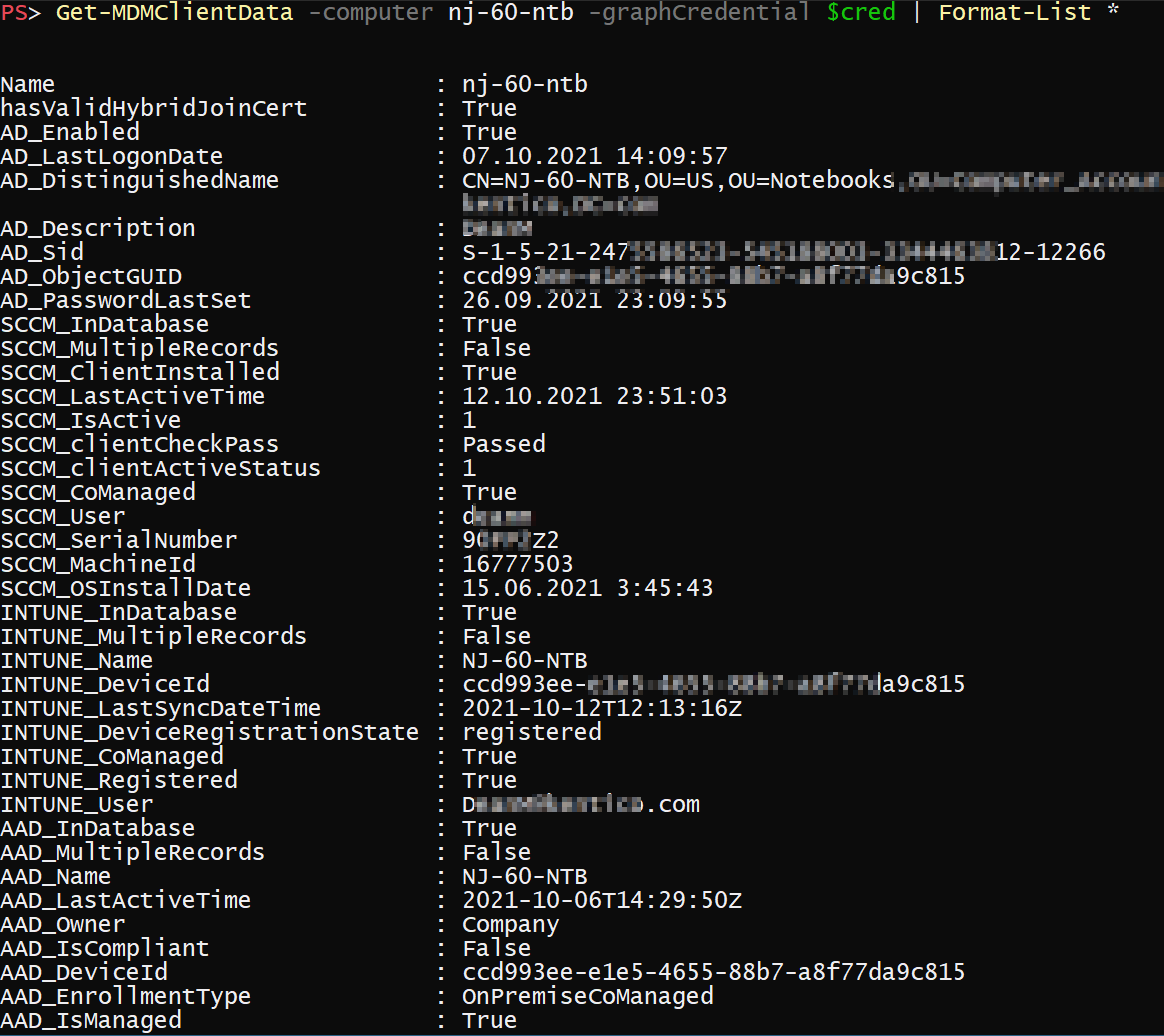
As you can see the resulting object contains all necessary data from all services to understand the current situation of the client and to easily compare data between services.
In the last chapter of this post, I will show you an example of the report that can be generated from this data.
Getting problematic clients report
For comparing data received by the Get-MDMClientData.ps1 function I have created function Get-ClientStatusReport
How function Get-ClientStatusReport works
Function Get-ClientStatusReport leverages function Get-MDMClientData for getting all necessary clients data. Then by defining several thresholds (which can be modified via function parameters) and some internal logic, it decides which clients are problematic. The result is returned as colored plaintext! So nothing fancy, therefore feel free to modify it to suit your needs.
How result can look like
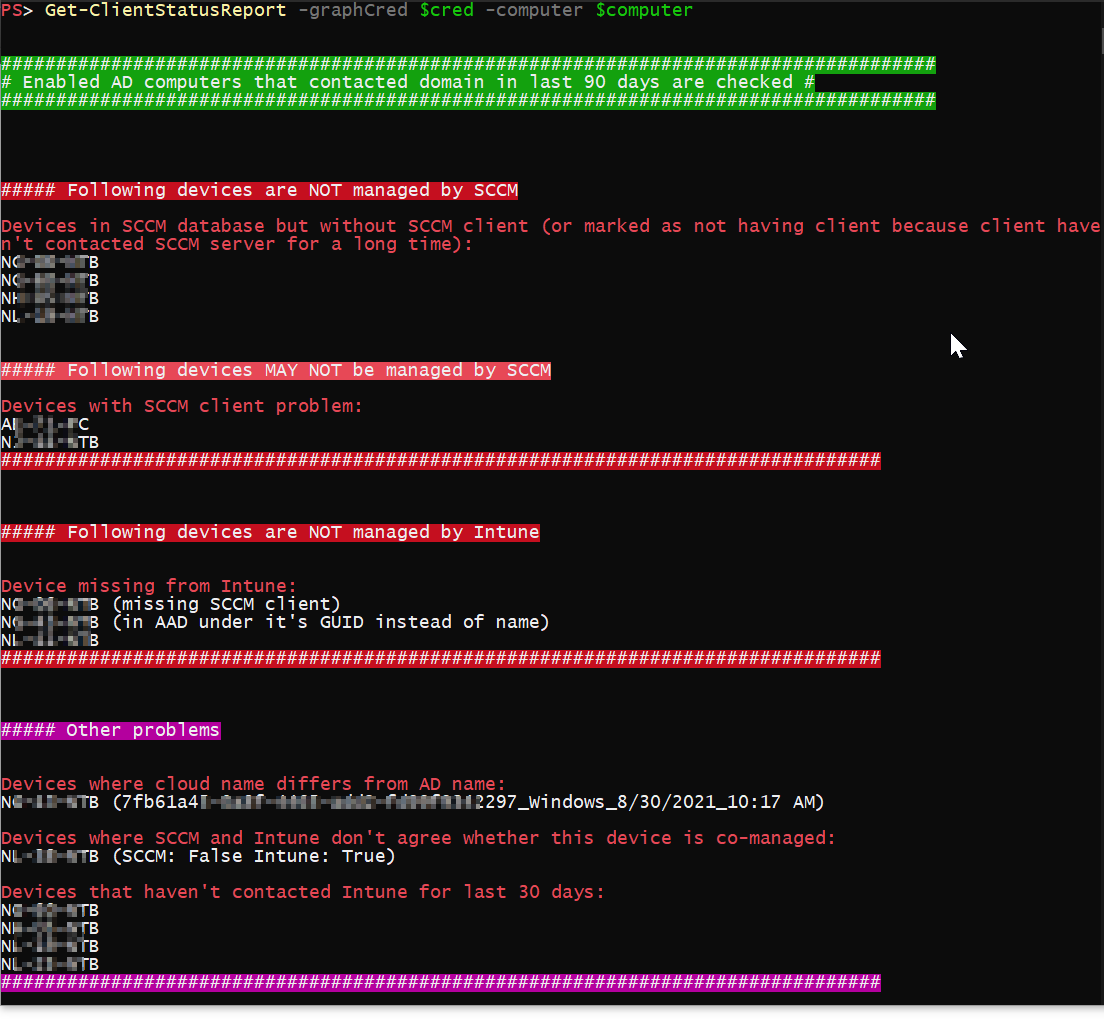
As you can see report gives you a list of problematic clients per service and additional data that can help you solve the problems if available.
Summary
With these two functions (Get-MDMClientData.ps1, Get-ClientStatusReport) you should be able to get good insight into your clients condition across your on-prem and cloud environments.
About the author
I work as System Administrator for more than 15 years now and I love to make my life easier by automating work & personal stuff via PowerShell (even silly things like food recipes list generation).
Comments
Join the discussionAt C:\Users\isaaco\Documents\Get-MDMClientData.ps1:122 char:39
- [ValidateNotNullOrEmpty()]
- ~ Parameter declarations are a comma-separated list of variable names with optional initializer expressions. At C:\Users\isaaco\Documents\Get-MDMClientData.ps1:122 char:39
- [ValidateNotNullOrEmpty()]
- ~ Missing ')' in function parameter list. At C:\Users\isaaco\Documents\Get-MDMClientData.ps1:330 char:39
- [ValidateNotNullOrEmpty()]
- ~ Parameter declarations are a comma-separated list of variable names with optional initializer expressions. At C:\Users\isaaco\Documents\Get-MDMClientData.ps1:330 char:39
- [ValidateNotNullOrEmpty()]
- ~
Missing ')' in function parameter list.
- CategoryInfo : ParserError: (:) [], ParseException
- FullyQualifiedErrorId : InvalidFunctionParameter
I get the above errors when I tried to dot source the script. Can you help please
Have you searched for FIXME string and replace them with correct values? It seems to me that you have not according the error message
Thank you for the swift reply. I did replace the tenant name and server name. Do I have to name them with the $ in front of the name or not? Ondrej Sebela
Isaac Oni use https://gist.github.com/ or similar service to share problematic part of the code with me. It will help me to understand the problem better.
You can use some dummy values instead of real one, but dont change the syntax/logic.
I realised my mistake and was able to dot source successfully. Now when I try to query client data, I get error below New-GraphAPIAuthHeader command isn't available At C:\Users\isaaco\Documents\Get-MDMClientData.ps1:67 char:13
- throw "New-GraphAPIAuthHeader command isn't available"
~~~~~~~~~~~~~~- CategoryInfo : OperationStopped: (New-GraphAPIAut...isn't available:String) [], RuntimeException
- FullyQualifiedErrorId : New-GraphAPIAuthHeader command isn't available Ondrej Sebela
Isaac Oni please try this version instead https://gist.github.com/ztrhgf/90bbeeb1dee4916f287bad806d8fa13b (don't forget to again replace the FIXMEs)
Thank you, I now get the error below
PS C:\Users\isaaco> Get-MDMClientData -computer nj-60-ntb -graphCredential $Cred | Format-List * Credentials for creating Graph API authentication header is missing At C:\Users\isaaco\Documents\Get-MDMClientData.ps1:98 char:29
- ... edential) { throw "Credentials for creating Graph API authentication ...
~~~~~~~~~~~~~- CategoryInfo : OperationStopped: (Credentials for...ader is missing:String) [], RuntimeException
- FullyQualifiedErrorId : Credentials for creating Graph API authentication header is missing
Isaac Oni I suppose you haven't provided the credentials in $cred variable then? Btw you should use device name from your environment instead of nj-60-ntb :)


