Command Palette

Search for a command to run...

Get a better Intune policy report part 3. (FINAL)

By combining information from MDMDiagReport.xml and system registry

Updated
4 min read
Get a better Intune policy report part 3. (FINAL)
O

I work as System Administrator for more than 15 years now and I love to make my life easier by automating work & personal stuff via PowerShell (even silly things like food recipes list generation).

What was my motivation to create my own rsop-like or gpresult-like Intune policy report? I was super frustrated by the built-in one (that you can generate in System settings) because it misses a lot of information plus shows a lot of useless ones.

In my previous post, I've talked about parsing Intune MDMDiagReport.xml report and how to extract a lot of helpful information from it.

As was stated MDMDiagReport.xml doesn't contain all Intune policies processing data. Scripts, Remediation scripts, and Win32Apps are missing. Therefore this final post will be about merging data retrieved from MDMDiagReport.xml with data from the client's system registry which contains needed information to get a complete picture.

Result will be PowerShell function (Get-ClientIntunePolicyResult) (now part of the IntuneStuff module) that outputs PowerShell object or HTML report about every Intune policy, script, application etc applied to your computer.


TL;DR

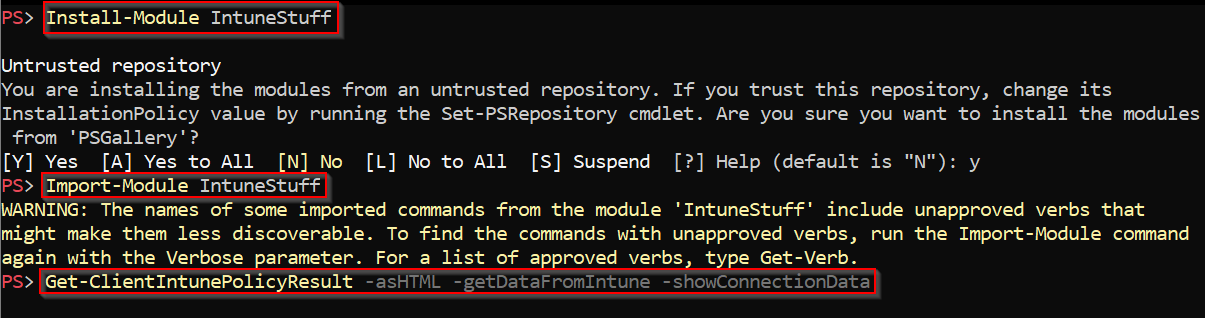
  • Install module IntuneStuff
  • Import the module
  • Run PowerShell function Get-ClientIntunePolicyResult image.png
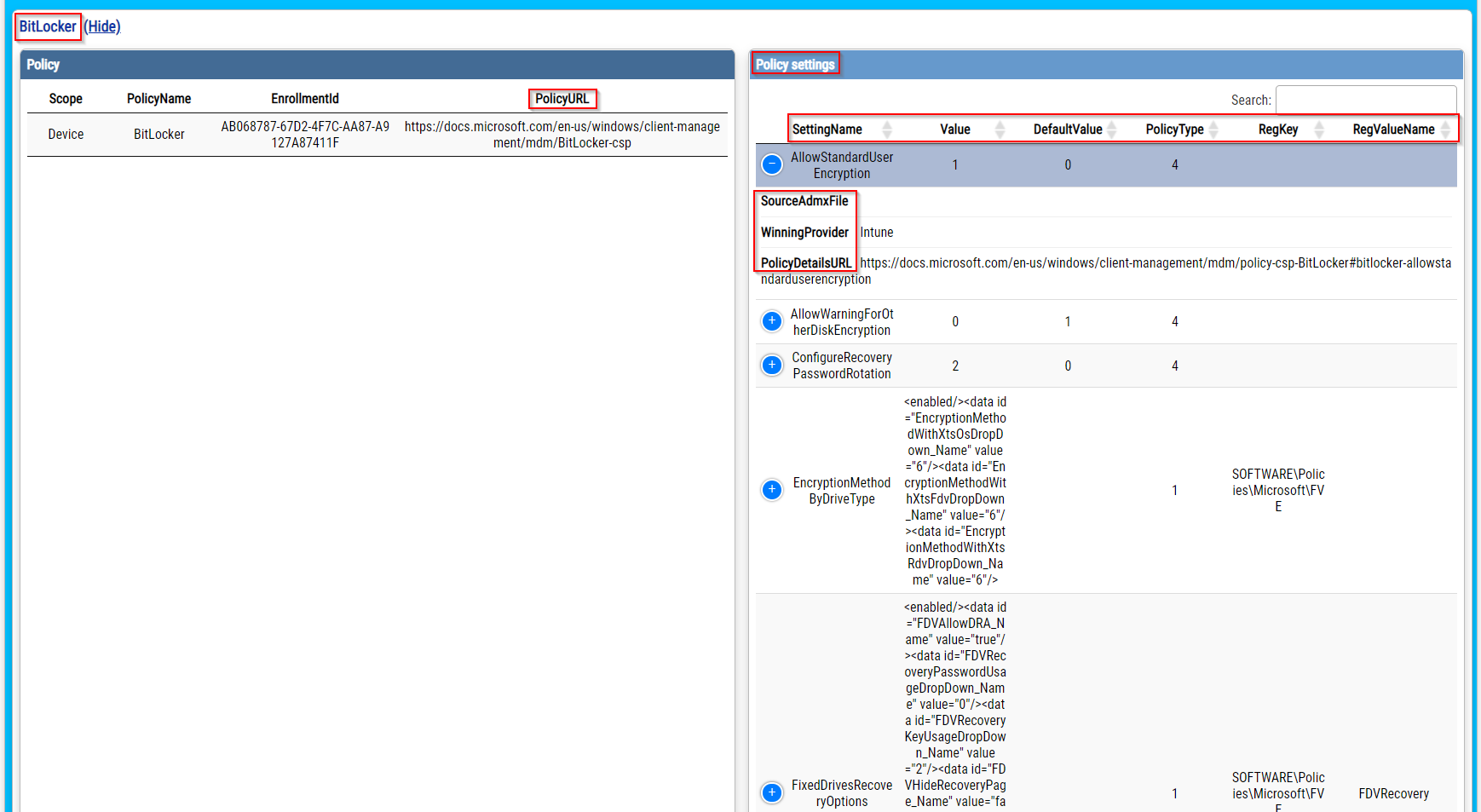
To get most detailed report (as HTML) call it like: Get-ClientIntunePolicyResult -asHTML -getDataFromIntune -showConnectionData -showEnrollmentIDs -showURLs and get result (interesting parts are highlighted) similar to image.png
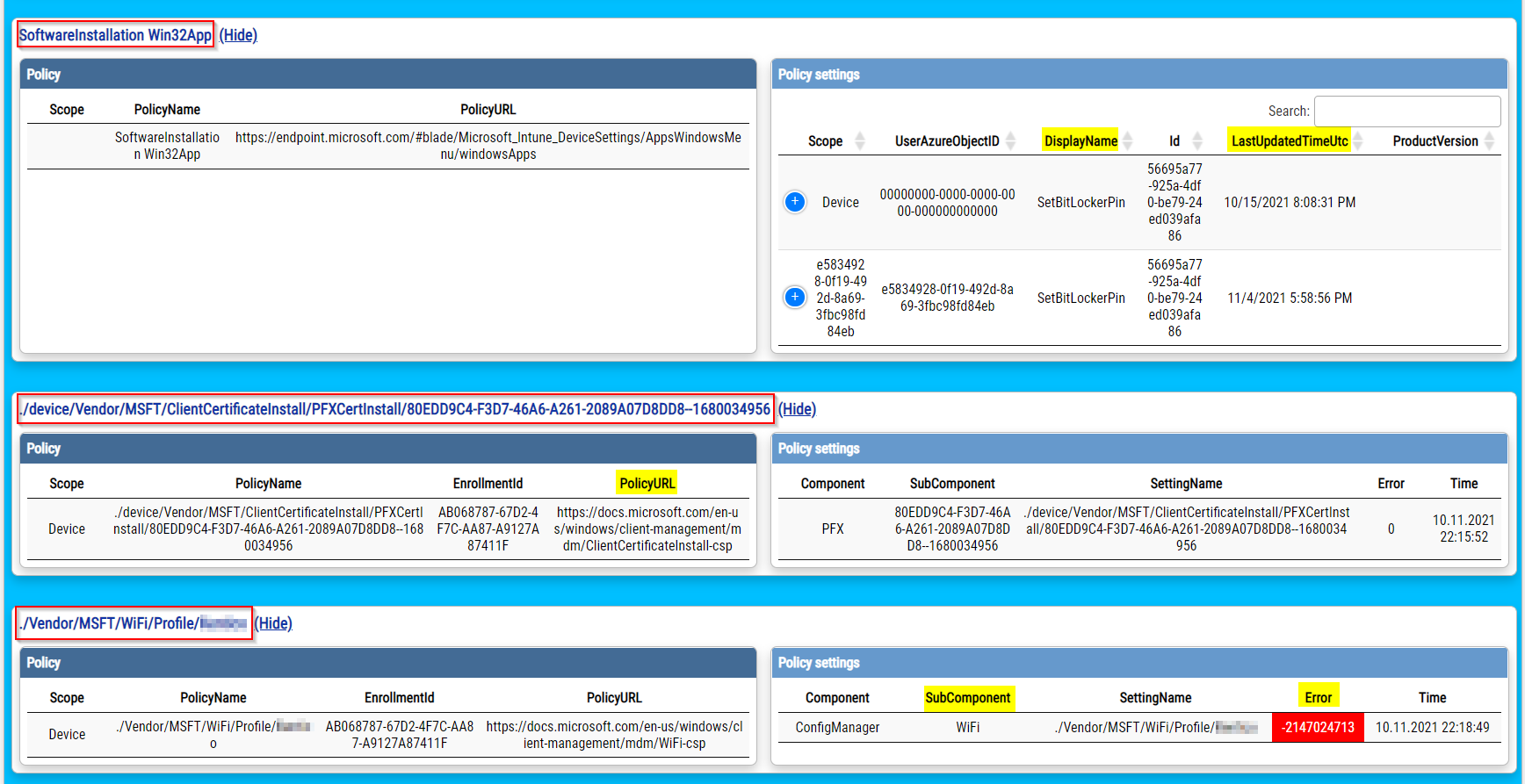
TIP: To get a working HTML report, open it in Chrome browser, not Internet Explorer!


Why should I care?

Built-in Intune HTML report has several disadvantages:

  • it is very confusing
    • is super long
    • shows a lot of useless information (I am looking at you KNOBS)
    • doesn't group information into meaningful sections (Bitlocker, Defender, MSI installations,...)
  • important data are missing
    • doesn't show Scripts, Win32Apps, and Remediation scripts at all
    • doesn't show details like what has policy changed (registry key/value), when was the last time policy was applied, errors
    • shows IDs instead of policy names
    • shows user01 instead of user SID
  • ...

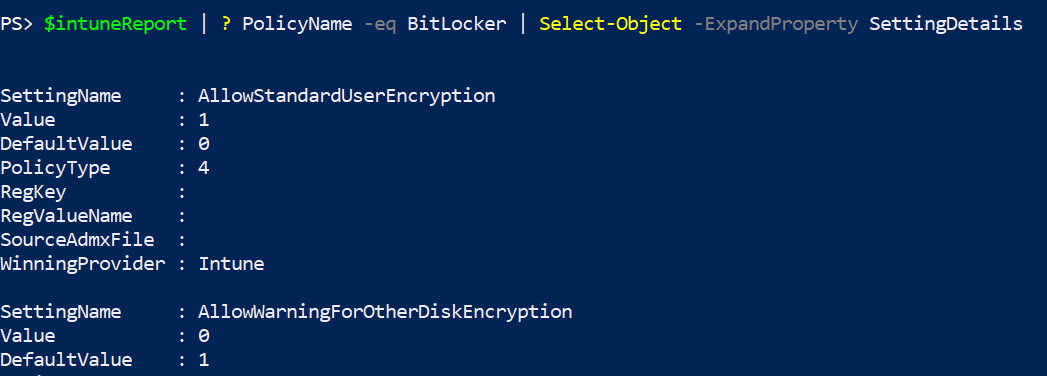
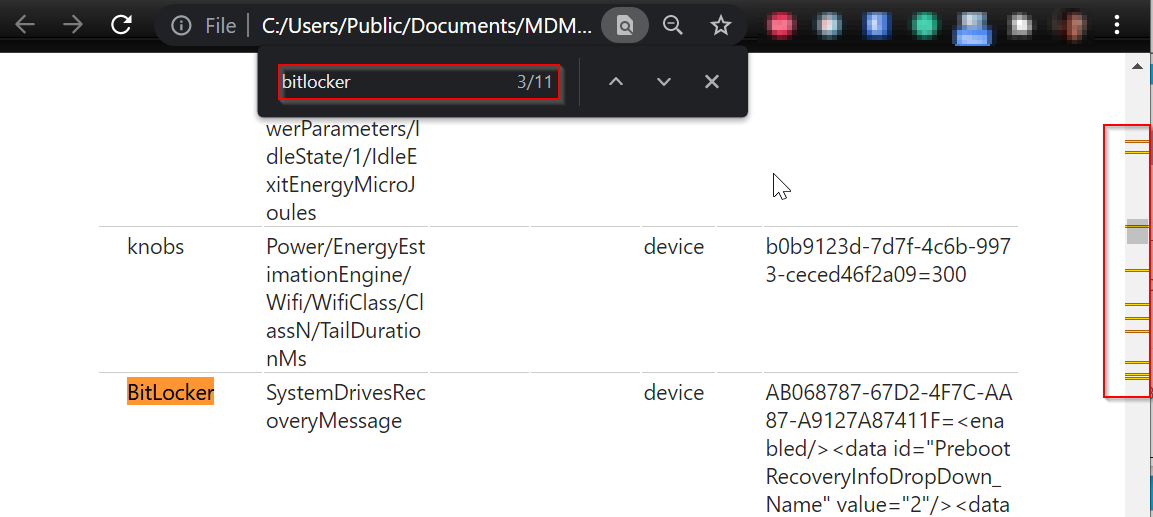
One example for all: searching for Bitlocker settings

Built-in Intune report built-in report.png
My report my report.png

What irritate me most is that all necessary data are stored on the client, so why isn't Microsoft using them to generate usable report? It was possible for old school GPO, so why not for 'modern' Intune?

What else interesting data do I get?

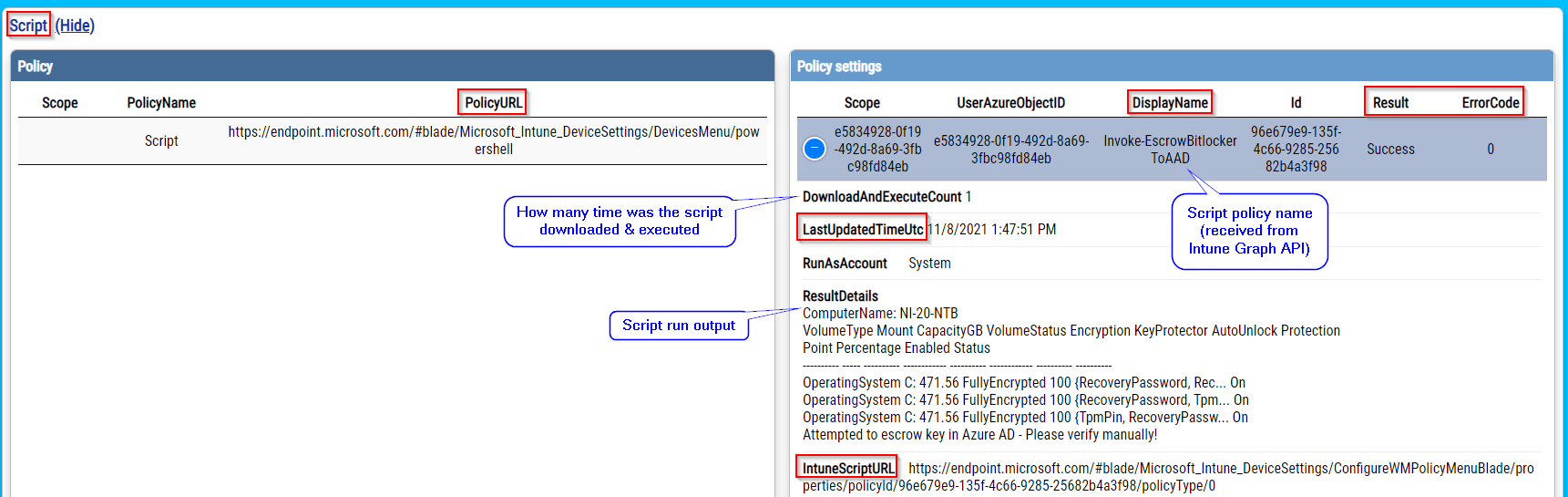
  • PolicyURL = URL to policy documentation (if available)
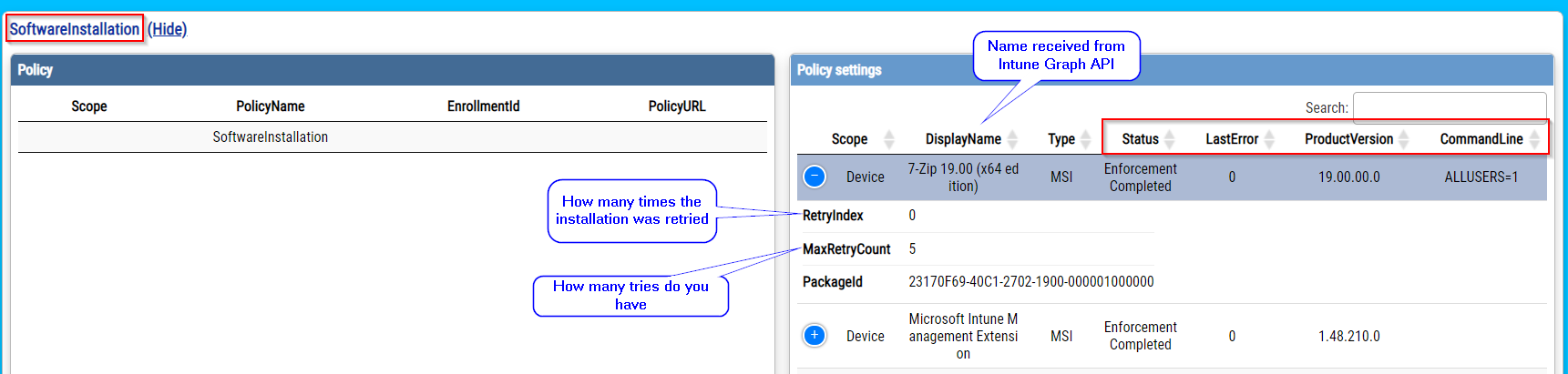
  • IntuneWin32AppURL, IntuneScriptURL, ... = URL of such item in Intune portal
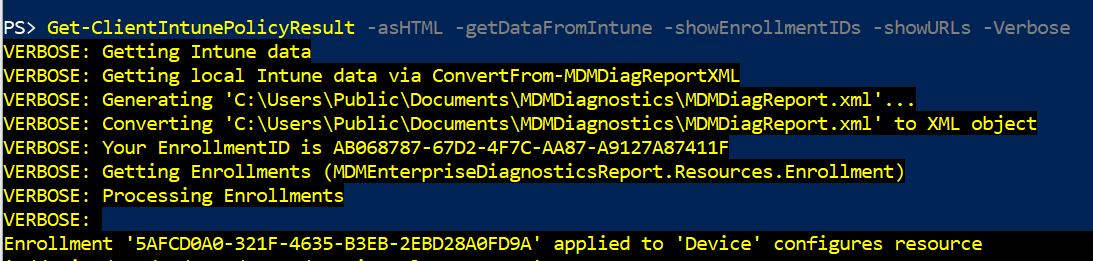
  • and lot more, please check screenshots bellow image.png image.png image.png
Where can I get processing data for Scripts, Remediation scripts, and Win32Apps?

Intune client stores a lot of useful information in the system registry. In general, it is at HKLM:\SOFTWARE\Microsoft\IntuneManagementExtension.

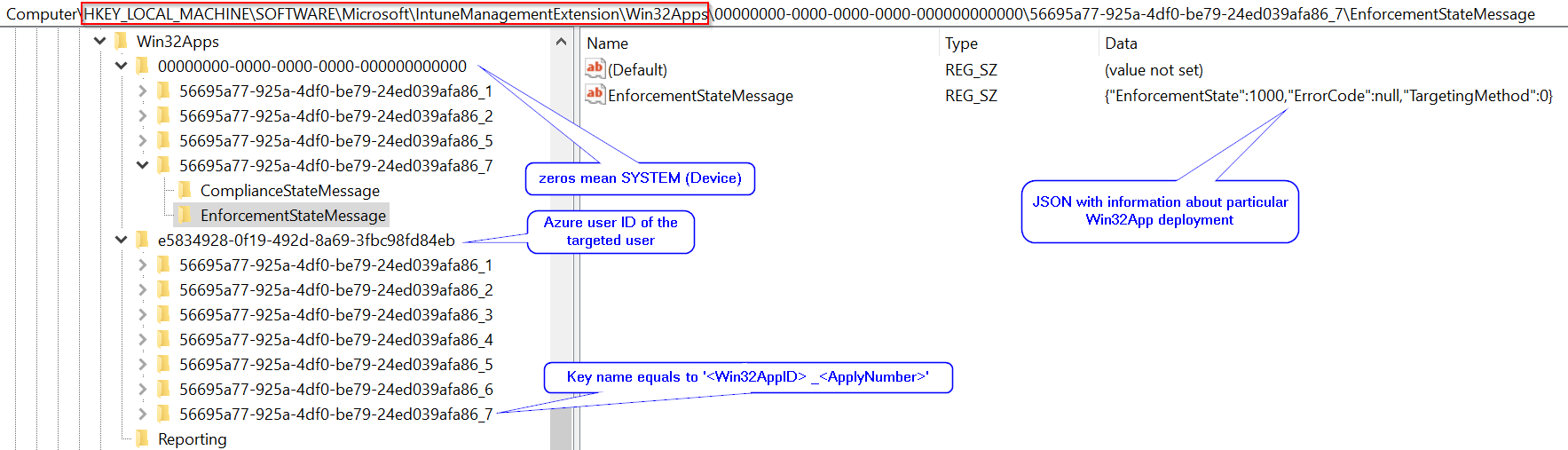
Win32App data

Win32App data are stored at HKLM:\SOFTWARE\Microsoft\IntuneManagementExtension\Win32Apps image.png
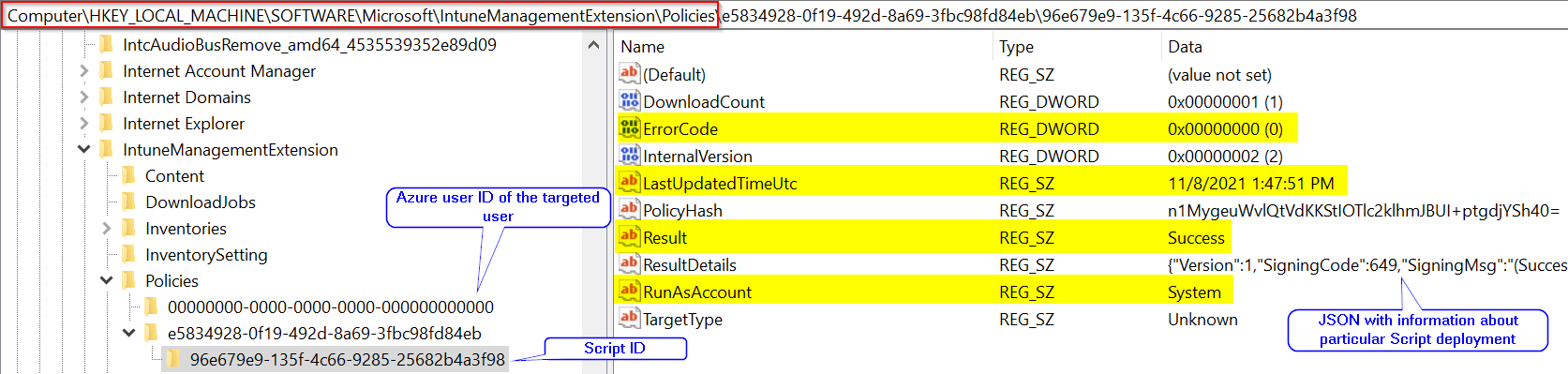
Scripts data

Script data are stored at HKLM:\SOFTWARE\Microsoft\IntuneManagementExtension\Policies image.png
Remediation scripts data

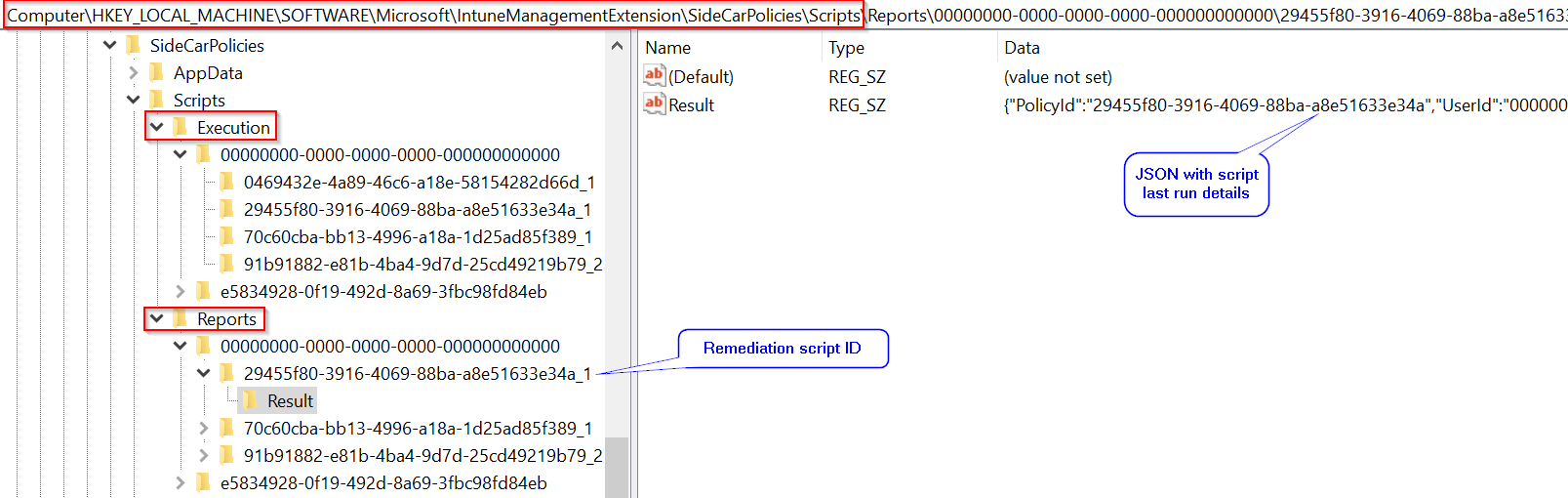
Remediation scripts data are stored at HKLM:\SOFTWARE\Microsoft\IntuneManagementExtension\SideCarPolicies\Scripts

  • Execution key contains last execution time
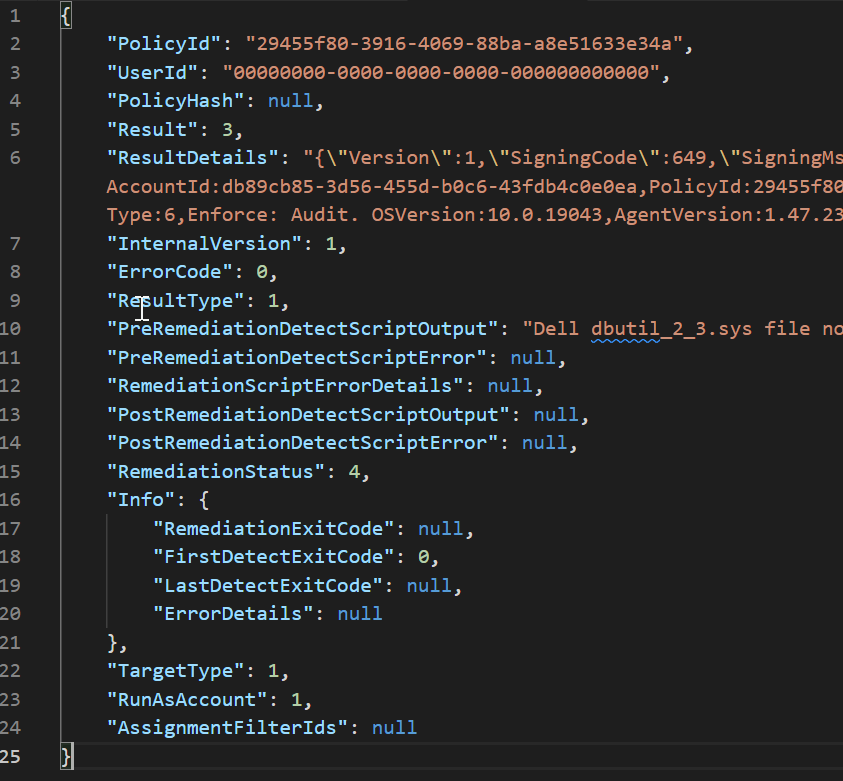
  • Reports key contains last run result image.png Converted Result JSON can look like this image.png

Where can I get Intune policies names?

As far as I know, Intune doesn't store policies name (like you can see them in Intune admin web portal) locally. If you are lucky, you will get a policy ID that you have to translate to the corresponding Intune policy name. To do that you have use Intune Graph API.

For working with Intune Graph API I am using the official PowerShell module Microsoft.Graph.Intune.

  • For making connection Connect-MSGraph.
  • For data retrieval Invoke-MSGraphRequest
$intuneRemediationScript = Invoke-MSGraphRequest -Url "https://graph.microsoft.com/beta/deviceManagement/deviceHealthScripts" | Get-MSGraphAllPages
$intuneScript = Invoke-MSGraphRequest -Url "https://graph.microsoft.com/beta/deviceManagement/deviceManagementScripts" | Get-MSGraphAllPages
$intuneApp = Invoke-MSGraphRequest -Url "https://graph.microsoft.com/beta/deviceAppManagement/mobileApps" | Get-MSGraphAllPages

It seems to me that a lot of Intune policy types cannot be linked to locally applied policies. At least I wasn't able to find their IDs in MDMDiagReport.xml. That's the reason that just some of the policies get a translation.


How can I use function Get-ClientIntunePolicyResult

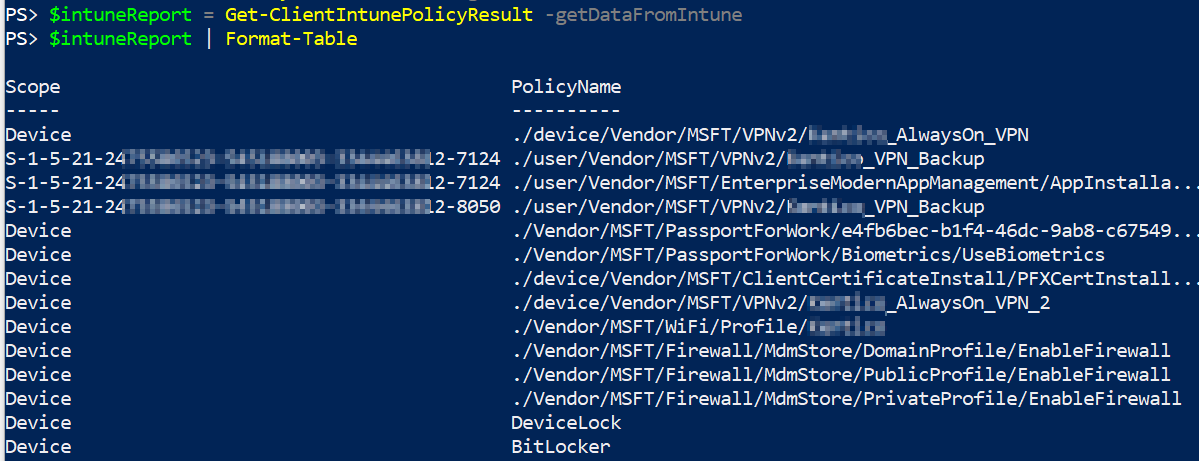
As was already stated function Get-ClientIntunePolicyResult can outputs HTML or PowerShell object. Getting object: image.png image.png Getting HTML report: image.png

Summary

There are still things to improve. Like getting error details from event log or local log files or making the function Get-ClientIntunePolicyResult faster. But in general, the work is done. We now have a useful 'gpresult' like tool for Intune policies 👍

K

This is fantastic, just found it and it's going to be very useful! Thank you so much.

One question, after the HTML has been produced I've noticed there are sections that seem to be skewed and there's no scroll bar on them to see the data on the right. Am I doing some wrong?

I used the following command: Get-ClientIntunePolicyResult -asHTML

1
O

Don't have this problem so hard to say, can you DM me on twitter (Ondrej Sebela with some screenshots? Btw have you tried to zoom out (CTRL -) if that helps?

K

Ondrej Sebela Well, that's embarrassing lol for some reason all browsers I tried skewed the view. Adjusting the zoom in and out made it display correctly. Thank you so much for the quick reply.

2
J
Jony Doe3y ago

Hey, nice work but your Module needs some polish and errorhandling. To fullfill the requirements you need to install "AzureRM.profile" and RSAT (for ActiveDirectory Cmdlets). After that you kind of getting a report but it's missing some stuff.

I am also hanging at the point of Jamie Holmes with the ConvertFrom-XML cmdlet. In Addition I am also getting this errors (German UI Language) after adding PoshFunctions to accomplish the ConvertFrom-XML requirement (without PoshFunctions the cmdlet is just unknown)

ConvertFrom-XML : Die Argumenttransformation für den Parameter "XML" kann nicht verarbeitet werden. Der Wert "System.Xml.XmlElement" kann nicht in den Typ "System.Xml.XmlDocument" konvertiert werden. Fehler: "Der angegebene Knoten 
konnte nicht als gültiger untergeordneter Knoten eingefügt werden, da der angegebene Knoten den falschen Typ hat."
In C:\Program Files\WindowsPowerShell\Modules\IntuneStuff\1.0.5\IntuneStuff.psm1:857 Zeichen:131
+ ... eDesktopAppManagementinfo.MsiInstallations | % { ConvertFrom-XML $_ }
+                                                                      ~~
    + CategoryInfo          : InvalidData: (:) [ConvertFrom-XML], ParameterBindingArgumentTransformationException
    + FullyQualifiedErrorId : ParameterArgumentTransformationError,ConvertFrom-XML

Get-ItemPropertyValue : Die Eigenschaft LastUpdatedTimeUtc ist im Pfad HKEY_LOCAL_MACHINE\SOFTWARE\Microsoft\IntuneManagementExtension\Win32Apps\00000000-0000-0000-0000-000000000000\GRS nicht vorhanden.
In C:\Program Files\WindowsPowerShell\Modules\IntuneStuff\1.0.5\IntuneStuff.psm1:1469 Zeichen:39
+ ... edTimeUtc = Get-ItemPropertyValue $newestWin32AppRecord.PSPath -Name  ...
+                 ~~~~~~~~~~~~~~~~~~~~~~~~~~~~~~~~~~~~~~~~~~~~~~~~~~~~~~~~~
    + CategoryInfo          : InvalidArgument: (:) [Get-ItemPropertyValue], PSArgumentException
    + FullyQualifiedErrorId : Argument,Microsoft.PowerShell.Commands.GetItemPropertyValueCommand

Get-ItemPropertyValue : Die Eigenschaft LastUpdatedTimeUtc ist im Pfad HKEY_LOCAL_MACHINE\SOFTWARE\Microsoft\IntuneManagementExtension\Win32Apps\f88474cf-0063-42e2-b7d2-f0d342f3ce5f\GRS nicht vorhanden.
In C:\Program Files\WindowsPowerShell\Modules\IntuneStuff\1.0.5\IntuneStuff.psm1:1469 Zeichen:39
+ ... edTimeUtc = Get-ItemPropertyValue $newestWin32AppRecord.PSPath -Name  ...
+                 ~~~~~~~~~~~~~~~~~~~~~~~~~~~~~~~~~~~~~~~~~~~~~~~~~~~~~~~~~
    + CategoryInfo          : InvalidArgument: (:) [Get-ItemPropertyValue], PSArgumentException
    + FullyQualifiedErrorId : Argument,Microsoft.PowerShell.Commands.GetItemPropertyValueCommand

Fehler beim Aufrufen der Methode, da [System.Management.Automation.PSObject] keine Methode mit dem Namen "op_Addition" enthält.
In C:\Program Files\WindowsPowerShell\Modules\IntuneStuff\1.0.5\IntuneStuff.psm1:1633 Zeichen:9
+         $intuneXMLReport += New-Object -TypeName PSObject -Property $ ...
+         ~~~~~~~~~~~~~~~~~~~~~~~~~~~~~~~~~~~~~~~~~~~~~~~~~~~~~~~~~~~~~
    + CategoryInfo          : InvalidOperation: (op_Addition:String) [], RuntimeException
    + FullyQualifiedErrorId : MethodNotFound
1
O

Thanks for feedback! Now I know where the problem is and it should be fixed now, just run "Install-Module IntuneStuff" to get new fixed version.

When I've migrated this function to module, I forgot to include my own ConvertFrom-XML function as it is not the same as in PoshFunctions.

It would be great if you could test this again and let me know.

Thanks

J
Jony Doe3y ago

Ondrej Sebela While updating your Module it hangs at the point for completion. It takes like 1-2min.

Running: Get-ClientIntunePolicyResult -asHTML -getDataFromIntune -showConnectionData -showEnrollmentIDs -showURLs

Throws: WARNUNG: Fehler beim Initialisieren des Standardlaufwerks: "Es wurde kein Standardserver gefunden, auf dem die Active Directory-Webdienste ausgeführt werden.".

And than nothing happens for another 1-2 minutes.

And than throws

Get-ItemPropertyValue : Die Eigenschaft LastUpdatedTimeUtc ist im Pfad HKEY_LOCAL_MACHINE\SOFTWARE\Microsoft\IntuneManagementExtension\Win32Apps\00000000-0000-0000-0000-000000000000\GRS nicht vorhanden.
In C:\Program Files\WindowsPowerShell\Modules\IntuneStuff\1.0.7\IntuneStuff.psm1:1477 Zeichen:39
+ ... edTimeUtc = Get-ItemPropertyValue $newestWin32AppRecord.PSPath -Name  ...
+                 ~~~~~~~~~~~~~~~~~~~~~~~~~~~~~~~~~~~~~~~~~~~~~~~~~~~~~~~~~
    + CategoryInfo          : InvalidArgument: (:) [Get-ItemPropertyValue], PSArgumentException
    + FullyQualifiedErrorId : Argument,Microsoft.PowerShell.Commands.GetItemPropertyValueCommand

Get-ItemPropertyValue : Die Eigenschaft LastUpdatedTimeUtc ist im Pfad HKEY_LOCAL_MACHINE\SOFTWARE\Microsoft\IntuneManagementExtension\Win32Apps\f88474cf-0063-42e2-b7d2-f0d342f3ce5f\GRS nicht vorhanden.
In C:\Program Files\WindowsPowerShell\Modules\IntuneStuff\1.0.7\IntuneStuff.psm1:1477 Zeichen:39
+ ... edTimeUtc = Get-ItemPropertyValue $newestWin32AppRecord.PSPath -Name  ...
+                 ~~~~~~~~~~~~~~~~~~~~~~~~~~~~~~~~~~~~~~~~~~~~~~~~~~~~~~~~~
    + CategoryInfo          : InvalidArgument: (:) [Get-ItemPropertyValue], PSArgumentException
    + FullyQualifiedErrorId : Argument,Microsoft.PowerShell.Commands.GetItemPropertyValueCommand

But the Report seems to work and look very detailed. Maybe this causes the waiting (at least 2min).

It would be nice to see the origin of the Settings. E.g. if you are using Security Baseline (which contains many CSPs) and see the report and want to change some settings (or other Configs) it would be nice to know the exact Config Profile. As you do with Softwareinstallation and Script Displayname. [I would suggest in the Polcy tab, next to "Scope".

Also PolicyDetailsURL (and PolicyURL) should be as href for an easy click. ;) Links could also be implemented into the Displayname with exact link to the Config Profile.

It's really a great tool/report. :) Thanks for that.

1
O

Jony Doe

I see.

This GRS registry key is relatively new thing. I will fix it tomorrow. (for now you can edit the function so it doesn't end there and continue instead)

According the active directory module. If you import it in ps console, does it show same error too? Anyway this error isn't related to my function. I saw it in past and solution was to explicitly select DC in the AD cmdlets (I think)

J
Jony Doe3y ago

Ondrej Sebela Great work. I edited my previous comment with some details and little feature request. It would be great if you find the time to implement it. Thanks a lot :)

O

Jony Doe

GRS errors are fixed now. Thanks for reporting all the errors 👍

According to the feature requests:

  • clickable hrefs: I am using PSWriteHTML module (New-HTMLTable command) to generate the HTML and I don't think this is possible because it takes the input as plain text (and not as HTML code)

  • policy names: I have to look into this, but no promises because I don't have much time right now

J

Hi, Im getting a fair few errors returned when I run this and I end up with an almost empty report, seems like it is having trouble converting from the xml:

PS C:\WINDOWS\system32> Get-ClientIntunePolicyResult -asHTML -showConnectionData -getDataFromIntune -Verbose -showURLs VERBOSE: Getting Intune data VERBOSE: Getting client Intune data via ConvertFrom-MDMDiagReportXML VERBOSE: Generating 'C:\Users\Public\Documents\MDMDiagnostics\MDMDiagReport.xml'... VERBOSE: Converting 'C:\Users\Public\Documents\MDMDiagnostics\MDMDiagReport.xml' to XML object VERBOSE: Getting EnrollmentID VERBOSE: Your EnrollmentID is 2380BB6B-9341-4A61-9662-371E30037C06 VERBOSE: Getting connection data VERBOSE: Getting Enrollments (MDMEnterpriseDiagnosticsReport.Resources.Enrollment) ConvertFrom-XML : Cannot process argument transformation on parameter 'XML'. Cannot convert value "System.Xml.XmlElement" to type "System.Xml.XmlDocument". Error: "The specified node cannot be inserted as the valid child of this node, because the specified node is the wrong type." At C:\Program Files\WindowsPowerShell\Modules\IntuneStuff\1.0.4\IntuneStuff.psm1:484 char:98

  • ... riseDiagnosticsReport.Resources.Enrollment | % { ConvertFrom-XML $_ }
  • ~~
    • CategoryInfo : InvalidData: (:) [ConvertFrom-XML], ParameterBindingArgumentTransformationException
    • FullyQualifiedErrorId : ParameterArgumentTransformationError,ConvertFrom-XML

ConvertFrom-XML : Cannot process argument transformation on parameter 'XML'. Cannot convert value "System.Xml.XmlElement" to type "System.Xml.XmlDocument". Error: "The specified node cannot be inserted as the valid child of this node, because the specified node is the wrong type." At C:\Program Files\WindowsPowerShell\Modules\IntuneStuff\1.0.4\IntuneStuff.psm1:484 char:98

  • ... riseDiagnosticsReport.Resources.Enrollment | % { ConvertFrom-XML $_ }
  • ~~
    • CategoryInfo : InvalidData: (:) [ConvertFrom-XML], ParameterBindingArgumentTransformationException
    • FullyQualifiedErrorId : ParameterArgumentTransformationError,ConvertFrom-XML

VERBOSE: Getting Policies (MDMEnterpriseDiagnosticsReport.PolicyManager.ConfigSource) ConvertFrom-XML : Cannot process argument transformation on parameter 'XML'. Cannot convert value "System.Xml.XmlElement" to type "System.Xml.XmlDocument". Error: "The specified node cannot be inserted as the valid child of this node, because the specified node is the wrong type." At C:\Program Files\WindowsPowerShell\Modules\IntuneStuff\1.0.4\IntuneStuff.psm1:638 char:107

  • ... agnosticsReport.PolicyManager.ConfigSource | % { ConvertFrom-XML $_ }
  • ~~
    • CategoryInfo : InvalidData: (:) [ConvertFrom-XML], ParameterBindingArgumentTransformationException
    • FullyQualifiedErrorId : ParameterArgumentTransformationError,ConvertFrom-XML

ConvertFrom-XML : Cannot process argument transformation on parameter 'XML'. Cannot convert value "System.Xml.XmlElement" to type "System.Xml.XmlDocument". Error: "The specified node cannot be inserted as the valid child of this node, because the specified node is the wrong type." At C:\Program Files\WindowsPowerShell\Modules\IntuneStuff\1.0.4\IntuneStuff.psm1:638 char:107

  • ... agnosticsReport.PolicyManager.ConfigSource | % { ConvertFrom-XML $_ }
  • ~~
    • CategoryInfo : InvalidData: (:) [ConvertFrom-XML], ParameterBindingArgumentTransformationException
    • FullyQualifiedErrorId : ParameterArgumentTransformationError,ConvertFrom-XML
O

Will check this today. Thanks for feedback 👍

O

I am afraid I will need to see your XML Intune report file. Please DM on Twitter Ondrej Sebela

O

It should be fixed in the new version of the InstuneStuff module. Run Install-Module IntuneStuff to get it 👍

1

More from this blog

D

Do it PowerShell way :)

78 posts

With over 15 years of experience as a system administrator, I have a passion for automating workflows using PowerShell. I believe in sharing my creations with the community. Why not, right? :)