
Command Palette

Search for a command to run...

Fixing Hybrid Azure AD join on a device using PowerShell

Published
1 min read
Fixing Hybrid Azure AD join on a device using PowerShell
O

I work as System Administrator for more than 15 years now and I love to make my life easier by automating work & personal stuff via PowerShell (even silly things like food recipes list generation).

Hybrid Azure AD join is a situation when a device is joined to on-prem AD and your Azure AD at the same time.

Let's say your device fulfills all requirements to be able to make Hybrid AD join:

  • device is enabled and joined to your on-prem AD
  • device has generated a certificate and stored it in the UserCertificate AD attribute
  • device is synchronized to your Azure AD (via the AD Connect tool)

But the result is device record in Azure with pending state i.e. Hybrid join wasn't finished from the client side.

On the client, Hybrid join is automatically invoked via scheduled task 'Automatic-Device-Join' image.png
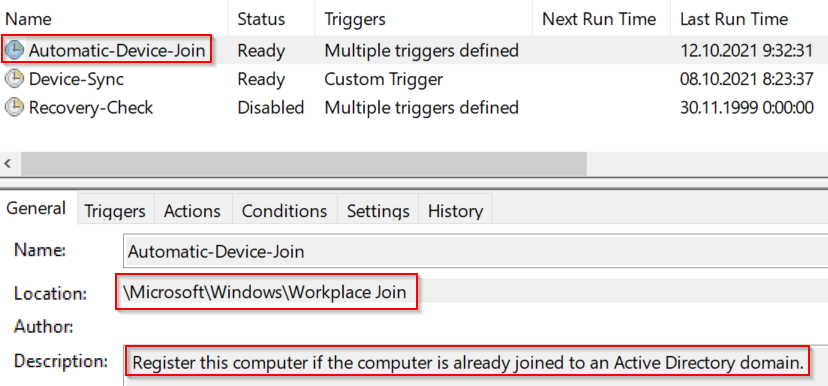
I was facing the situation when this scheduled task run but ended with an error, so I came up with a simple PowerShell function Reset-HybridADJoin that will basically reset Hybrid join status on the computer.

Function will:

  • un-join computer from AzureAD (using dsregcmd.exe)
  • remove leftover certificates
  • invoke rejoin (using sched. task 'Automatic-Device-Join')
  • inform user about the result

Maybe it will help somebody...

G
Gee2y ago

When I run Reset-HybridADJoin.ps1 I get no output at all. No matter where I run it on any machine in the domain. All machines are domain joined and hybrid registered. Any idea what no output is indicative of?

O

That's because you just dot source the function in it. You need to call Reset-HybridADJoin then

M

Awesome script! Wondering if you could help me figure out an enhancement. dsregcmd /join requires Internet access in the context of the system account. Our environment requires proxy authentication, which is usually done by logging into a system and opening a web browser (initiating Internet access in the context of a domain user account via sso). Once authenticated, any account on the machine (including system account) will have Internet access. Is there something we could add to your script that would initiate a connection to a website like Microsoft in the context of a domain user account prior to running the sections of your script that depend on Internet access?

O

Thanks 😉

According to your problem, if you want a kind of manual way, you can use something like https://debug.to/696/open-url-in-browser-in-powershell

If you need to authenticate to some Azure etc..Maybe something like "Connect-AzureAD -AccountId (whoami -upn)"?

More from this blog

D

Do it PowerShell way :)

78 posts

With over 15 years of experience as a system administrator, I have a passion for automating workflows using PowerShell. I believe in sharing my creations with the community. Why not, right? :)