# Extracting HTML table from a web page (or HTML file) and converting it into PowerShell object
Several months ago I've created [ConvertFrom-HTMLTable](https://github.com/ztrhgf/useful_powershell_functions/blob/master/ConvertFrom-HTMLTable.ps1) function for helping me **extract HTML tables** from locally saved HTML files or live web pages and **convert ** them into usable **PowerShell objects**. So it is not a new function but I think it deserves a standalone post because it can be quite handy.
I've used it when I was talking about working with [Confluence tables](https://doitpsway.com/how-to-createupdateread-html-table-on-confluence-wiki-page-using-powershell) and now it helped me to retrieve a **list of all SCCM logs** from the [official documentation page](https://docs.microsoft.com/en-us/mem/configmgr/core/plan-design/hierarchy/log-files) for my [Get-CMLog](https://doitpsway.com/powershell-function-that-super-simplifies-getting-the-right-sccm-log) function.
If you check that documentation page you will see there are several tables with dozens of log names so it would be a nightmare to get them by hand.
So how did I get all these log names? 👇
```
# get content of web page
$pageContent = Invoke-WebRequest -Method GET -Uri "https://docs.microsoft.com/en-us/mem/configmgr/core/plan-design/hierarchy/log-files"
# save all html tables
$allTables = $pageContent.ParsedHtml.getElementsByTagName('table')
# convert html tables to PowerShell objects
$allTablesAsObject = $allTables | Foreach-Object { ConvertFrom-HTMLTable $_ }
# output just 'Log name' property
$allTablesAsObject.'Log name'
```
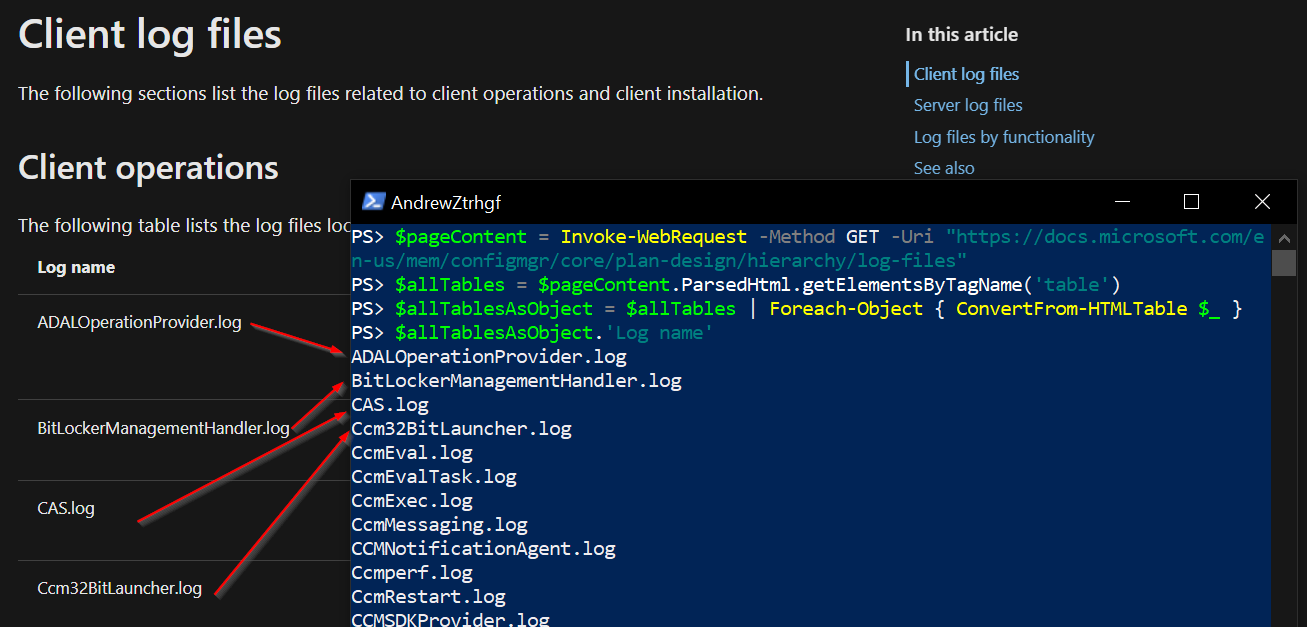
And the result was like this 👇
Easy right? 🤓
---
# Features of the ConvertFrom-HTMLTable function
- **converts ** ComObject representing HTML table **to PowerShell object**
- it can be retrieved from a **local HTML** file or **web page** (check function examples)
- supports setting the **name of the table** as 'TableName' property of the PowerShell object
- supports HTML tables **without header**
- if a table has 2 columns it will return a PowerShell object where the first column will be names of the properties and second their values
- if a table has more than 2 columns, a PowerShell object will have numbers as property names
---
Enjoy 🎁